Select a topic
Choose a topic from the list on the left to explore how the Accutrak platform delivers insights and operational control.
In-Shift Production Dashboard
Live production intelligence, updated throughout the shift
Real-Time Visibility When It Matters
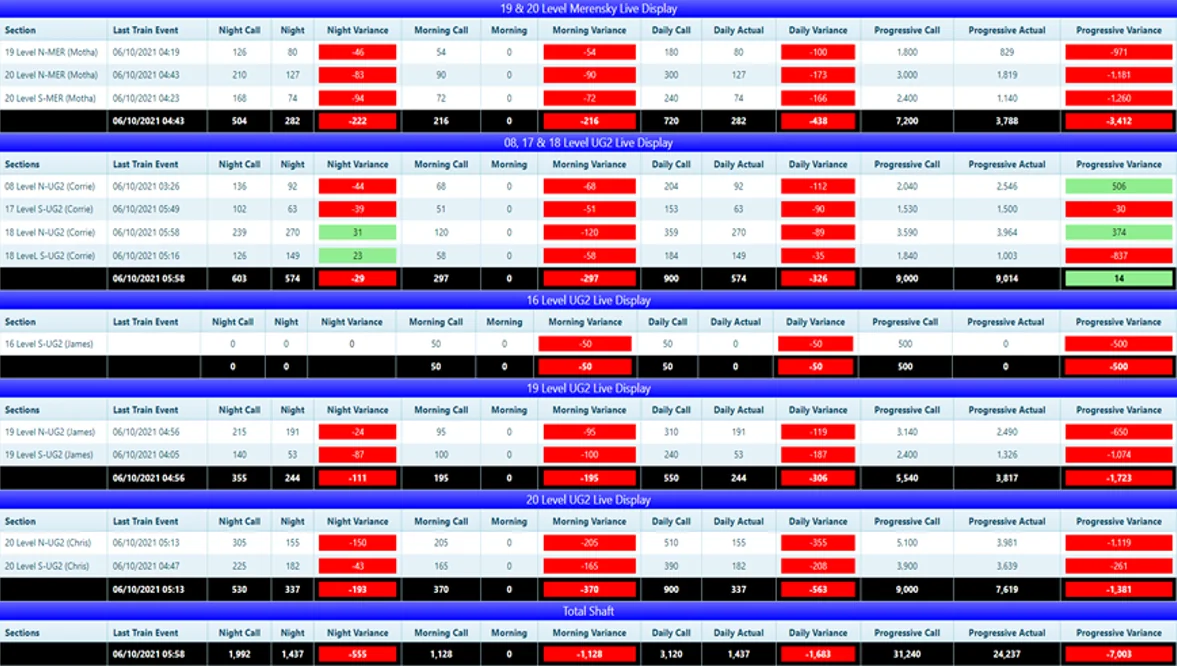
The Accutrak platform delivers a single, live production view across your entire instrumented operation. Whether you are monitoring Smartrail underground, Trucktrak TMMs, Minegaze surface fleet, or Conveyor Belt Scales, all data feeds into unified dashboards that update in near-real time throughout the shift.
In-Shift Control, Not Post-Shift Reporting
Unlike traditional reporting tools that deliver insight after the shift ends, the Accutrak dashboard gives supervisors, production engineers, and management the information they need while there is still time to act. Call vs actual comparisons, live tonnage totals, fleet utilisation indicators, and productivity metrics are all available from the moment the shift starts.
Live Tonnage and Flow
Per-system tonnage, flow rate, and trip counts updated continuously throughout the shift.
Call vs Actual
Live comparisons between planned and actual production, visible at every level of the operation.
Drill-Down Access
Drill from operation-level totals down to individual machine, level, or conveyor performance.
Multi-System View
Smartrail, Trucktrak, Minegaze, and Conveyor Belt Scales consolidated into a single operations view.
"From weighing event to data on screen in under 10 seconds. No waiting for end-of-shift reports, no manual tallying, no guessing. Every shift starts with a live baseline and ends with a verified record."
Aggregated Production Reports
Shift, daily, and monthly reporting across every instrumented system
From Raw Data to Structured Intelligence
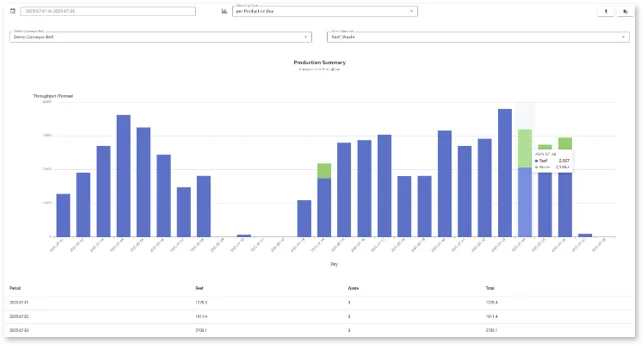
Every production event captured across the Accutrak platform is stored and structured for reporting at any aggregation level: per event, per shift, per production day, per month, or across custom date ranges. Reports draw on the same verified data that drives the live dashboards, so summary figures and drill-down views are always consistent.
What You Can Report On
- Production summary: Total tonnage by shift, production day, week, and month. Reef and waste split. Contributions from belt scales, locos, and TMMs consolidated.
- Performance: Fleet availability, utilisation, cycle times, trip counts, and loader productivity KPIs.
- Comparison: Actual vs planned (call), shift-to-shift, and period-to-period comparisons.
- Asset: Per-machine histories, maintenance flags, and utilisation trends over time.
- Downtime: Idle time breakdowns, downtime analysis, and event-level investigation reports.
Self-Service Access
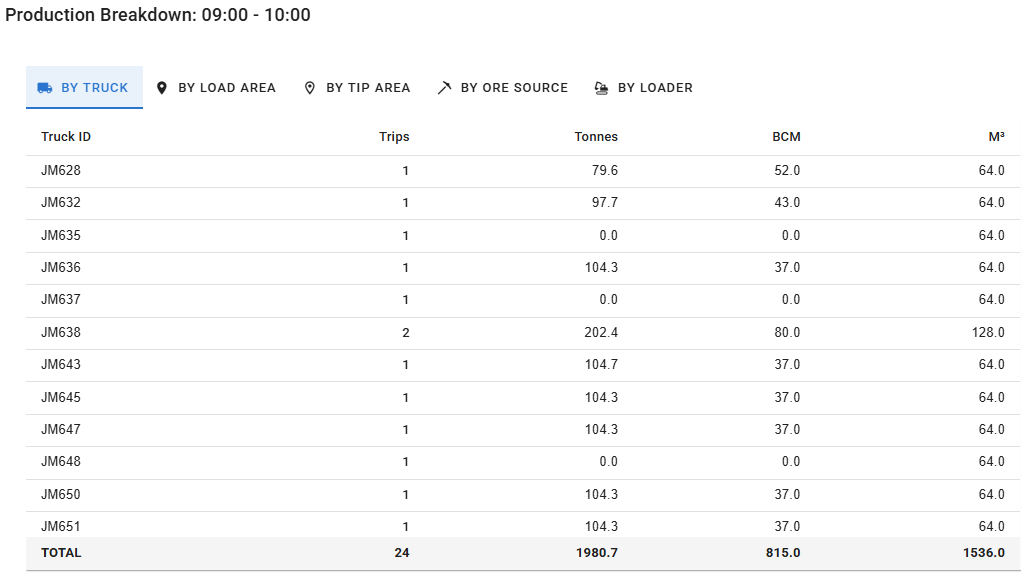
All reports are accessible through the self-service platform without requiring support intervention. Apply interactive filters for product, shift, asset, section, or time period.
All reports can be exported as PDF or Excel. PDF exports are formatted for distribution and presentation. Excel exports deliver structured data for further analysis, reconciliation, or integration with finance and planning tools.
"The same verified data drives both the live dashboard and every historical report. There is no reconciliation gap between what operations sees in real time and what finance sees in the monthly summary."
Push Notifications
Automated, customisable alerts that reach the right person at the right time
Act on Events as They Happen
Waiting for a shift report to surface an incident means the opportunity to respond has already passed. Accutrak's push notification system delivers automated alerts the moment a defined condition is met, enabling immediate response to performance shortfalls, non-compliance events, and maintenance triggers.
Fully Customisable
Every notification is configured to match the specific thresholds and escalation paths that matter to your operation. There is no fixed alert set. You define what matters, who should know about it, and through which channel it is delivered.
Performance Alerts
Trip count below shift target, hourly tonnage below threshold, idle time exceeding defined limit, loader productivity falling short.
Non-Compliance Alerts
Tipping outside approved zones, route deviation on road fleet, unauthorised standstill, belt running without material load.
Maintenance Alerts
Load cell deviation detected, sensor diagnostic flag raised, asset exceeding maintenance threshold, extended breakdown.
Security Alerts
Material car at unauthorised location, route deviation on high-value haulage, security inspection not completed.
Immediate and Actionable
Each notification includes the event detail, asset identity, timestamp, and location where applicable. Notifications are delivered through your preferred channel: in-app, email, Telegram, or WhatsApp. Multiple recipients and escalation paths can be configured per alert type, ensuring the right person is always informed at the right time.
"When a truck tips outside an approved area, the right person knows within seconds. Not after the shift. Not on a report the next morning. Immediately, with the exact location, asset, and time of the event."
Scheduled Reports
Receive the reports you need, automatically, without manual extraction
Self-Service Report Scheduling
The Accutrak platform includes a self-service module that allows any authorised user to configure reports for automatic delivery on a defined schedule. No support request, no manual extraction, no waiting. Configure the report once and it arrives automatically, exactly when you need it.
How It Works
- Select the report type from the available report library.
- Apply filters: product, section, asset group, material type.
- Choose the delivery schedule: end of shift, daily, weekly, or monthly.
- Select the export format: PDF for formatted presentation or Excel for data analysis.
- Select the delivery channel and configure the recipient list.
- The report generates and delivers automatically at the specified time.
Typical Use Cases
- End-of-shift production summaries delivered to the shift supervisor and mine manager simultaneously.
- Daily tonnage and KPI report delivered to the operations team every morning.
- Weekly production review delivered to management automatically every Monday.
- Monthly fleet utilisation report delivered to maintenance and operations heads.
- Compliance reports delivered to the relevant safety or security stakeholder on a defined schedule.
No Manual Intervention Required
Once a scheduled report is configured, it runs independently. Recipients receive structured, formatted reports as PDF or Excel — with charts, tables, and data exports — without anyone having to extract, compile, or send them manually. Changes to recipients, schedules, filters, or export format can be made at any time through the self-service interface.
"The mine manager receives the overnight production summary before the morning meeting, every day, automatically. No one has to compile it. No one has to send it. It is just there."
Devices
Access your operational data wherever decisions are made
Designed for the Full Range of Mining Environments
The Accutrak platform is web-based and device-agnostic. Whether your team is in the control room, on the pit floor, underground, or at a remote management office, they access the same live data through the device that is most practical in their environment.
Live Displays
Purpose-built screens deployed at underground tips, shaft landings, and control rooms. Always on, no login required, continuously updated.
Laptops and Desktops
Full platform access through any modern browser. No local installation required. Accessible on-site or remotely via secure connection.
Tablets
Used for mobile data capture in the field. Checklists, forms, and dispatch confirmations feed directly back to the central system in real time.
Mobile Devices
Dashboards, reports, and push notifications accessible through mobile browsers. Alerts delivered directly via Telegram or WhatsApp.
Live Displays Underground
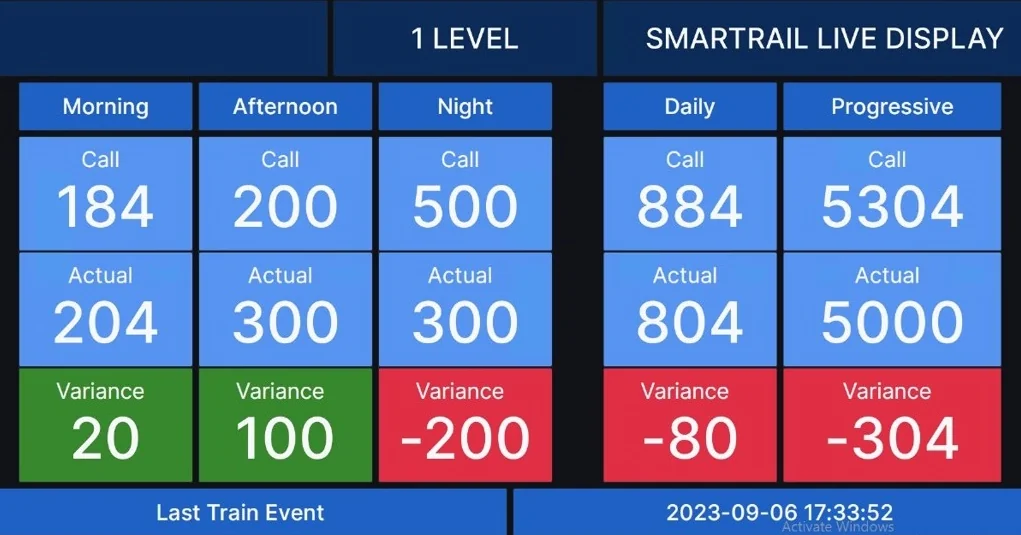
Smartrail level display screens at underground tips are a proven example of purpose-built deployment. Loco operators and section supervisors see live shift performance and call vs actual tonnage as they pass, without a device, without a login, and without any manual update. The screen pulls live data directly from the system and updates after every train event.
Tablets in Field Workflows
Tablets assigned to maintenance teams, banksmen, and security inspectors enable structured data capture directly at the point of action. The Accuchip surface management process runs entirely on tablets: pre-dispatch checklists, maintenance records, dispatch confirmations, and security inspections are all completed on-device and linked automatically to the relevant asset and trip record.
"The request from operators was simple: put the numbers where we can see them. A live display at the tip answered that. It required no device, no login, no training. The screen showed the shift target, the actual tonnes, and whether they were ahead or behind. That was enough."
Delivery Channels
Reach your team where they are, through the channel they use
Multi-Channel Delivery
Every notification, report, and alert from the Accutrak platform can be delivered through one or more of four delivery channels. You configure which channel is used for each notification or report type, based on what is most appropriate for the recipient and the urgency of the information.
In-App
Notifications and alerts delivered directly within the Accutrak platform interface. Suitable for operations staff monitoring live dashboards throughout the shift.
Scheduled reports, summary notifications, and non-urgent alerts delivered by email. Supports formatted reports with charts, tables, and export attachments.
Telegram
Primary channel for real-time push notifications. Instant messages with event detail, asset identity, timestamp, and coordinates. Supports group delivery to entire teams simultaneously.
Same format as Telegram, available where WhatsApp is the standard communication tool for operational teams. Widely adopted across Southern African mining operations.
Configuring Channels per Alert Type
Different events warrant different channels. A security alert requiring immediate action is suited to Telegram or WhatsApp, where messages are received instantly regardless of whether the recipient is at a desk. A monthly production summary is suited to email, where the formatted report can be reviewed at the appropriate time. The Accutrak platform allows each alert type and scheduled report to be assigned its own channel and recipient list independently.
Telegram Groups for Operational Teams
Telegram groups allow a single alert to reach an entire team simultaneously. A non-compliance event can notify the shift supervisor, the safety officer, and the section engineer in a single message, ensuring coordinated response without multiple manual notifications. Groups can be configured per operation, per system, or per alert category, giving each stakeholder visibility of exactly the events that are relevant to their role.
"Operations uses Telegram for security events because it reaches everyone who needs to know, instantly, wherever they are on site. Management uses email for the weekly production review because they need the formatted report with the charts. Both run automatically. Neither requires anyone to manually send anything."
Digital Forms & Workflows
Standalone or integrated with any Accutrak product to capture supplementary operational data
Flexible Data Capture at the Operation
The Accutrak Digital Forms & Workflows platform enables operations to replace paper-based processes with structured, digital data capture. It operates as a standalone system or integrates directly with any Accutrak product — allowing supplementary information to accompany sensor and telemetry data from the same interface your team already uses.
Configurable Forms
Design forms to match your operational requirements — pre-shift inspections, incident reports, material declarations, compliance checklists, or any structured data capture need. No coding required.
Workflow Routing
Route completed forms through approval chains automatically. Submissions trigger configurable workflows — notify a supervisor, escalate overdue items, archive to a central register, or push data to integrated systems.
Notification Services
Form submissions and workflow state changes generate automated notifications via the same channels as the broader Accutrak platform — in-app, email, Telegram, or WhatsApp — ensuring the right people are informed at the right time.
Product Integration
Attach form data to a specific asset, shift, or event captured by any Accutrak product. A conveyor belt condition report can be linked to the belt's live telemetry record. A truck inspection form can be associated with that vehicle's tracking history for the shift.
Standalone Operation
Digital Forms & Workflows does not require any other Accutrak product to function. It can be deployed as an independent solution for operations that need structured digital data capture and automated routing, without any hardware or tracking infrastructure. A single web-based interface is accessible from laptops, tablets, and mobile devices across the operation.
Integration with Accutrak Products
When deployed alongside Smartrail, Trucktrak, AccuChip, or other Accutrak products, the forms platform adds a human data layer to the automated sensor data. Maintenance observations, material quality assessments, shift handover notes, and other information that cannot be captured automatically can be structured, submitted, and linked to the relevant operational records in the same platform.
"We use it for pre-shift vehicle inspections — the technician completes the form on a tablet, it notifies the supervisor immediately if anything is flagged, and the record is automatically attached to that vehicle's shift data. It closed a gap that paper never could."
Dispatch
Operator identification, material selection, loader allocation, and truck dispatching via onboard tablets
Structured Dispatching from the Cab
The Accutrak Dispatch module gives operators a structured interface on their onboard tablet to identify themselves, select the material they are hauling, and receive loader and destination assignments directly from the control room. Every interaction is recorded, timestamped, and synchronised with the server in real time.
Operator ID
Operators log in at the start of each shift using their unique ID. The system links all activity — trips, loads, speeds, and events — to the individual operator for the duration of the shift. Operator changes during a shift are captured and attributed correctly.
Material Selections
Operators select the material type being hauled at the point of loading. Material selections are associated with each trip cycle, enabling accurate production reporting by material type across loaders, trucks, and destinations.
Loader Allocations
Control room operators assign trucks to loaders through the dispatch interface. Allocation instructions are pushed to the truck's onboard tablet instantly, directing the operator to the correct loader without radio intervention. Re-allocations are pushed in real time as fleet dynamics change during the shift.
Two-Way Communication
The onboard tablet maintains a live two-way link with the server, enabling instructions to flow from the control room to the operator and status updates to flow back. Operators can acknowledge assignments, flag issues, or request reassignment through the tablet interface.
Control Room and Laptop Interface
Dispatch is managed from the same Accutrak platform interface used for dashboards and reporting. Control room staff and engineers with laptop access have a live view of fleet assignments, operator IDs, material selections, and active cycles across the operation. Allocation changes made at the control room are reflected on the truck's tablet immediately, without requiring radio communication.
Server-Linked Architecture
All dispatch events — logins, material selections, loader assignments, acknowledgements — are written to the server in real time and available immediately in the reporting and analytics layer. Shift production can be reviewed by operator, by loader, by material type, or by destination, with no manual data consolidation required at end of shift.
"The dispatcher pushes the loader assignment to the truck. The operator sees it on the tablet, accepts it, and drives. No radio, no confusion about which loader to go to, and the system records exactly who was assigned where and when. The production report writes itself."
Mine Planning Integration
In-shift and aggregated throughput and compliance insights against planned targets
Connect Plan to Actual
The Accutrak platform integrates with mine planning systems to bring planned production targets into the same view as live and historical actuals. Whether targets are pushed automatically via API or entered manually by planning staff, the platform continuously measures performance against them throughout the shift - not just at the end of it.
This enables in-shift compliance monitoring, giving supervisors and engineers the ability to identify shortfalls, reassign resources, and close the gap while there is still time to act. The same integration powers aggregated reporting, producing shift-on-shift and period-on-period compliance summaries without any manual data consolidation.
API Integration
Connect directly to your mine planning or scheduling system via API. Targets, section assignments, and material calls are ingested automatically and kept current throughout the shift without manual input.
Manual Inputs
Where a direct API connection is not in place, targets can be entered manually through the self-service interface. Per-shift, per-section, and per-material targets are supported, with changes taking effect immediately in the live dashboard.
In-Shift Compliance
Live call vs actual comparisons are visible throughout the shift at every level - operation, section, loader, and machine. Supervisors see exactly where performance is tracking against plan while there is still time to intervene.
Aggregated Compliance Reporting
Shift-on-shift and period-on-period compliance reports show throughput against plan across any time range. Identify systemic underperformance by section, machine, or material type across production days, weeks, and months.
Throughput and Compliance in One View
By combining planned targets with live and historical actuals, the platform produces a single source of truth for throughput and compliance. Production engineers and mine planners work from the same data as operations, eliminating reconciliation gaps and ensuring that planning decisions are grounded in verified production performance.
"The plan is in the system before the shift starts. By mid-shift, every supervisor can see exactly where they are against it. That visibility alone changed how quickly people responded to shortfalls."
Telemetry
Non-intrusive OEM and proprietary CAN Bus data capture across the fleet
Data from the Machine, Not Around It
Accutrak installs non-intrusive devices that read directly from a machine's OEM CAN Bus - the internal communication network that carries live data between the engine, transmission, hydraulics, and other onboard systems. No hardware modifications are required. The device listens passively to the bus, extracting the telemetry data that is already present without interfering with OEM systems or voiding warranties.
This gives the Accutrak platform access to a rich stream of machine-level data that is unavailable from GPS or sensor-only approaches - including engine hours, fuel consumption, fault codes, RPM, temperatures, and load states - delivered in real time alongside production and tracking data.
OEM CAN Bus Reading
Non-intrusive devices tap the existing OEM CAN Bus on LHDs, dump trucks, locos, and other mining machines. Engine data, fault codes, fuel levels, and operational states are ingested passively without modifying the machine or affecting OEM systems.
Proprietary AccuCAN Bus
Where additional sensor coverage is required, Accutrak's proprietary CAN Bus - AccuCAN - extends the data layer beyond what the OEM provides. It allows Accutrak's own devices and off-the-shelf sensors to be installed and integrated across the fleet using the same data architecture.
Any Sensor, Any Fleet
AccuCAN is designed for flexibility. Load cells, inclination sensors, vibration sensors, proximity detectors, and other off-the-shelf devices can be connected and integrated across mixed fleets - standardising telemetry capture regardless of machine make, model, or age.
Ingest, Wrap and Transmit
All telemetry data packets - whether from the OEM bus or AccuCAN - are ingested, wrapped in the Accutrak data format, and transmitted to the cloud platform for processing. Data arrives structured and ready for integration with production, tracking, and reporting systems.
One Data Stream, Multiple Purposes
The telemetry pipeline feeds directly into the Accutrak platform alongside GPS tracking and production event data. Engine hours and fuel consumption contribute to utilisation and cost reporting. Fault codes and temperature alerts feed maintenance notifications. Load states and RPM data support production event validation. A single installation serves the full range of operational and maintenance intelligence requirements.
"We are not adding hardware to the machine - we are listening to what the machine is already saying. The OEM data has always been there. We just make it accessible, structured, and actionable alongside everything else the platform captures."